
Game development is done on tight deadlines and with several budget constraints.
This is where AI tools for game development become a saving grace. They take over all the repetitive work that eats up valuable development time, whether it's asset generation, code development, or bug testing. Tasks that once took human hours can now be completed by AI tools for game development in seconds.
But before we start using any of these AI tools randomly, spend some time studying them and their uses. Why? Because not every AI platform deserves a place in your workflow.
Remember: A strong AI tool for game development should:
Solve a specific bottleneck (asset generation, testing, dialogue, animation)
Gel easily with engines like Unity, Unreal, or Godot
Scale with your team size and budget
Speed up production, but without technical debt
Many teams fail with AI because they adopt tools for novelty rather than necessity. Consult the list of top game development companies to find more AI tools that could help you in different stages of game development.
How Game Developers Use AI Tools: Stats That Prove the Impact.
1.87-90% of game developers are already using AI agents in their workflows
2. Nearly 90% of video game developers use AI agents.
3. 97% believe generative AI is reshaping the industry, expressing strong confidence in its transformative impact.
4. 95% developers leverage AI to reduce repetitive work, freeing developers to focus on tasks they love.
5. 47% use AI to speed up playtesting and balancing, one of the most time-consuming phases of development.
6. 45% leverage AI for localization and translation, speeding delivery across global markets.
7. 44% use AI to improve code generation and scripting support, demonstrating its practical use in engineering workflows.
8. Nearly 94% expect AI to reduce long-term development costs, reflecting strong financial optimism.
9. Around 73% of game studios report actively using AI in some capacity, underscoring broad industry penetration.
10. 79% of developers view AI tools positively, according to industry trend data, indicating a largely favorable perception.
source: dataconomy, prnewswire, reuters, and gam3s
AI Tools by Game Development Stage (Where They Actually Work)
1. Pre-Production & Ideation
Ludo.ai – For market-driven Ideation and validation
Best for: Game Idea generation, market research, trend spotting, feature exploration, and competitive research
Pricing: Free trial, paid tiers
Looking for commercially viable new game concepts? Try Ludo.ai.
This powerful AI tool not only helps you generate, validate, and refine your game ideas but also helps you determine in advance whether the game is likely to succeed, thanks to its market research capabilities. This saves developers from committing months to a project that looks good on paper but may have no real market demand.
If you are already working on a game idea, it enables you to find similar games, identify feature overlaps, and pinpoint market gaps, helping you position your game more effectively.
Also, if you feel stuck, Ludo.ai can expand on your creative ideas, spotlight unexplored niches, suggest mechanics and themes, and recommend feature combinations that have been tested and proven.
Where Ludo.ai Fits in the Game Dev Pipeline
| Stage | Role of Ludo.ai |
| Ideation | 🟢 Core strength |
| Market research | 🟢 Strong |
| Prototyping | 🟡Indirect (idea guidance only) |
| Asset creation | 🔴Not focused here |
| Coding & engine work | 🔴 Not applicable |
| Live ops & analytics | 🔴Not its scope |
2. Environment & Asset Creation
Promethean AI – World Building at Scale
Best for: Level designers and environment artists
Pricing: Free for individuals; paid for studios
Create detailed 3D environments and virtual worlds in minutes with Promethean AI. This advanced AI-powered tool speeds up world-building by automating repetitive, time-consuming tasks such as scene layout, asset placement, and environment dressing. Instead of manually populating scenes, it uses high-level commands to do so based on context and artistic intent.
Promethean AI’s semantic search helps you find the right asset from the studio’s entire asset library based on style, intent, and context, rather than relying on folder names.
PrometheanAI also integrates with game engines such as Unreal Engine, Unity, Maya, and Blender, without requiring asset uploads or workflow changes. This allows teams to add AI-driven production gains without replacing their existing pipeline.
Where Promethean AI Fits in the Game Dev Pipeline
| Stage | Role of Promethean AI |
| World building & level design | 🟢 Core Strength |
| Prototyping | 🟢 Strong (rapid environment and layout iteration) |
| Production & scaling | 🟢 Strong (large-world consistency and speed) |
| Asset creation | 🟡 Assists with placement, not asset generation |
| Ideation | 🟡 Indirect (environment concepts & spatial support) |
| Market research | 🔴 Not its focus |
| Coding & engine work | 🔴 Not applicable |
| Live ops & analytics | 🔴 Not its scope |
Explore UI/UX design companies for environment and asset creation.
3. Animation & Movement
Cascadeur – Physics-Aware Animation
Best for: Character animation realism
Pricing: Paid
Cascadeur is a crackerjack of an AI tool for generating realistic character movements. This AI-assisted animation tool uses physics-aware motion to create natural animations with minimal manual corrections.
To ensure proper balance, weight, and momentum, Cascadeur relies on AI-powered pose analysis and auto-physics tools. Animations’ jumps, acrobats, and combats are refined, and unrealistic poses are corrected with ease.
Another good thing about Cascadeur: It easily gels with existing animation pipelines used by Unreal Engine and Unity. And because the animations are engine-ready, they can be dropped directly into production. This powerful AI tool is ideal for studios that want to scale up animation production without sacrificing realism.
Where Cascadeur Fits in the Game Dev Pipeline
| Stage | Role of Cascadeur |
| Character animation | 🟢 Core strength |
| Combat & movement design | 🟢 Strong |
| Polishing & optimization | 🟢 Strong |
| Prototyping | 🟡 Limited (animation validation only) |
| Ideation | 🔴 Not applicable |
| World building | 🔴 Not applicable |
| Asset creation | 🔴 Not focused here |
| Coding & engine work | 🔴 Not applicable |
| Live ops & analytics | 🔴 Not its scope |
4. NPC Dialogue & Behavior
Charisma.ai – Narrative-Driven Conversations
Best for: Story-heavy games
Pricing: Free for small projects
If your game is story-driven, then Charisma.ai should be your go-to AI tool. This AI-powered conversational tool enables writers to create emotionally rich dialogue that shapes stronger character personalities. These emotionally responsive characters can hold meaningful conversations, rather than use static dialogue trees, making interactions feel more alive and reactive.
Charisma. aoi is perfect for real-time dialogue delivery for immersive storytelling. The tool is ideal for studios well-suited to story-heavy games that emphasize character and narrative depth and player agency.
This is especially powerful for RPGs, interactive fiction, and narrative storytelling.
Where Charisma Fits in the Game Dev Pipeline
| Stage | Role of Charisma.ai |
| Narrative design | 🟢 Core strength |
| Character dialogue | 🟢 Core strength |
| Player choice & branching | 🟢 Strong |
| Prototyping | 🟢 Strong (conversation flow testing) |
| World-building (lore) | 🟢Strong |
| Voice & performance logic | 🟡 Limited (depends on integrations) |
| Asset creation | 🔴 Not focused here |
| Character animation | 🔴 Not applicable |
| Coding & engine systems | 🟡 Limited (integration support only) |
| Live ops & analytics | 🟡 Limited (basic conversation insights) |
For related narrative and AI services, consult the Artificial intelligence companies listed here.
5. Coding, AI Logic & QA
GitHub Copilot – AI Pair Programming
Best for: Code completion and debugging
Pricing: Free for students; paid for teams
If coding feels heavy and hard, use GitHub Copilot for AI-powered pair programming. This coding powerhouse offers on-the-spot code suggestions, fills in the gaps, and even generates boilerplate code based on your comments and surrounding code context.
The Copilot supports multiple programming languages used in game development and is best suited for scripting, gameplay systems, AI logic, and backend services. Taking care of mundane coding tasks allows teams to focus on core activities such as architecture, performance, and problem-solving, enabling studios to speed up production without expanding team size.
Where GitHub Copilot Fits in the Game Dev Pipeline
| Stage | Role of GitHub Copilot |
| Coding & scripting | 🟢 Core strength |
| Gameplay systems | 🟢 Strong |
| Backend & tooling | 🟢 Strong |
| Prototyping | 🟢 Strong |
| Debugging & refactoring | 🟡 Limited (assists, but doesn’t replace testing) |
| Engine integration | 🟡 Limited (depends on developer context) |
| Asset creation | 🔴 Not applicable |
| Character animation | 🔴 Not applicable |
| Narrative design | 🔴Not focused here |
| Live ops & analytics | 🟡 Limited (code-level support only) |
6. Marketing & Launch Assets
Hotpot.ai – Storefront & Promo Assets
Best for: Game marketing visuals and promotional assets
Pricing: Free with paid credits for advanced usage
Hotpot.ai is an AI-powered creative tool that helps studio teams generate marketing assets such as banners, thumbnails, posters, and social media creatives without depending on dedicated design resources. This makes it extremely easy for indie developers and small teams to generate assets for game launches and updates.
The platform provides image generation, background removal, upscaling, and graphic enhancement tools to maintain visual consistency across promotional campaigns. By delivering polished visuals quickly, Hotpot.ai allows studios to focus on messaging, positioning, and distribution rather than production overhead.
Where Hotpot. ai Fits in the Game Dev Pipeline
Stage | Role of Hotpot.ai |
| Marketing & promotion | 🟢 Core strength |
| Storefront asset creation | 🟢 Core strength |
| Social media creatives | 🟢 Strong |
| Prototyping marketing art | 🟢 Strong |
| Branding & visual polish | 🟡 Limited (template-driven) |
| In-game asset creation | 🔴 Not focused here |
| Character animation | 🔴 Not applicable |
| Gameplay & coding | 🔴 Not applicable |
| Narrative design | 🔴 Not applicable |
| Live ops & analytics | 🔴 Not its scope |
Check with the top 10+ advertising agencies for marketing asset tools.
How to Choose the Right AI Stack
Selecting the right AI tools will help you fast-track the development process. But then, selecting the right tools isn’t about adopting the most advanced technology; it’s about solving the most significant issues in the development pipeline. And this is only possible when you have a strategic and informed team at your side. The smartest teams introduce AI tools to fast-track processes, not as a show off.
The Right AI Stack for Indie Teams
Indie teams operate on limited budgets and under tight deadlines. Their goal is to make the most of the minimum resources available to them.
Indie Teams should focus on:
Asset generation
Take advantage of various AI tools to speed up the creation of art, UI elements, audio, and promotional assets for marketing and storefront use. This translates into lower dependency on external vendors.
Code assistance
AI-powered coding tools take all the grunt work out of coding. It speeds up scripting, enabling developers to focus on the core gameplay mechanics.
Marketing leverage
AI tools for developing storefront visuals, trailers, and social media content help indie game developers compete on a more level playing field with larger studios.
For Indie games, AI helps them achieve production-quality games on a low budget.
The Right AI Stack for Studios
Larger studios deal with different challenges, among others, complex pipelines, long production cycles, and so on.
Larger studios face different challenges—complex pipelines, multiple teams, and long production cycles. Here, AI should enhance reliability, scale, and consistency.
Studio Game developers should focus on:
QA automation
QAautomation tools will help identify and fix bugs and improve performance throughout the development cycle, not at the end, reducing costly fixes.
AI behavior systems
Advanced AI tools power more intelligent NPC behavior, adaptive gameplay systems, and dynamic world interactions that scale with requirements.
Toolchain stability
Use AI tools that work well with existing engines, version control systems, and production workflows. Stability and long-term support should trump experimental features.
Game Development Workflow: Without AI vs With AI Tools
Aspect |
| With AI Tools | |
| Asset creation | Manual asset creation | AI automates repetitive asset generation | |
| Asset refinement | Repeated asset tweaks and rework | Faster iteration with AI-assisted adjustments | |
| Production timelines | Long deadlines | Reduced production friction and quicker delivery | |
| Bug handling | Growing bug lists during development | AI-supported workflows help detect and manage issues | |
| Testing process | Slow, manual testing cycles | AI-assisted testing and validation | |
| Workflow efficiency | Traditional workflow with heavy rework | Streamlined, AI-assisted workflow | |
| Creative ideation | Fully manual brainstorming | AI supports ideation and content suggestions | |
| Dialogue & characters | Scripted manually | AI-powered dialogue and character systems | |
| Game content planning | Manual concept development | AI-driven planning tools |
Conclusion
Game developers are warming up to AI tools, which are accelerating game development. Right from ideation, asset creation, coding, and dialogue to marketing, AI tools for game developers cover all stages of game development, reducing overall development costs and speeding up workflows without sacrificing quality.
When used strategically and thoughtfully, AI acts as a productivity booster, enabling developers to focus more of their valuable time on creativity, innovation, and delivering immersive gaming experiences that resonate with players globally.
AI tools for Game Development - FAQs
What are the best AI tools for game development?
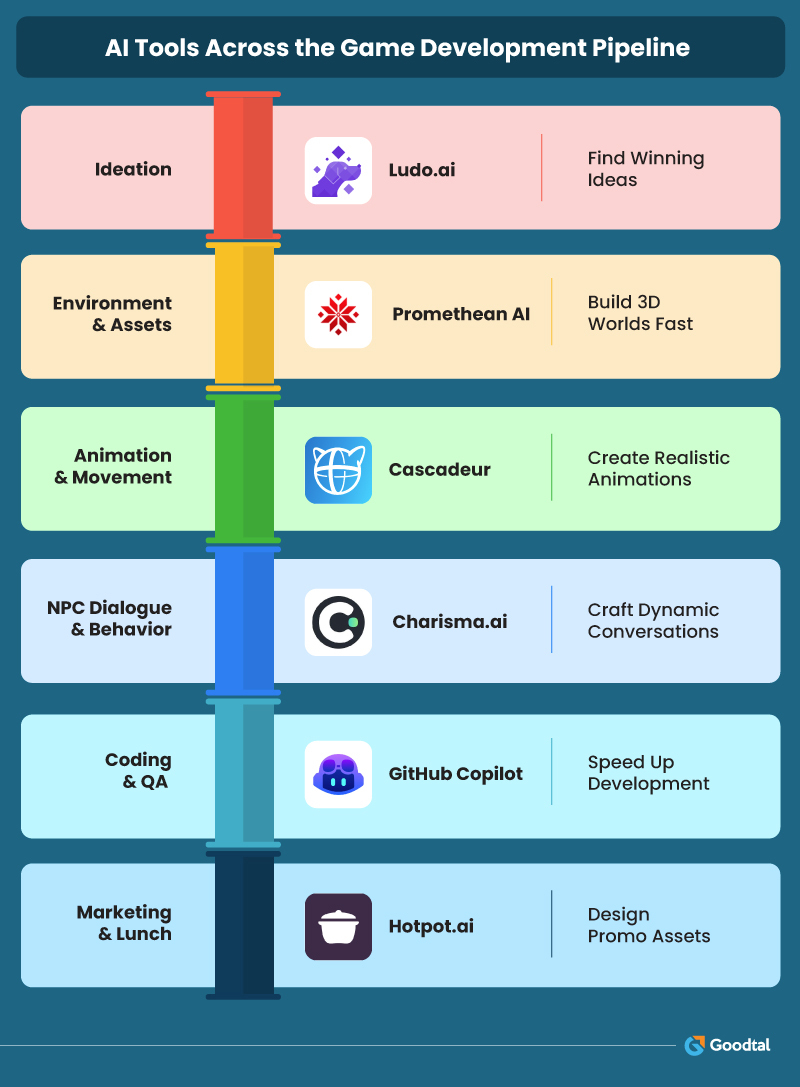
Tools like Ludo.ai for market-driven Ideation and validation, Promethean AI for world-building, Cascadeur for realistic animation, Charisma.ai for narrative-driven conversations, and GitHub Copilot for coding are widely used.
How does AI help indie game developers?
AI accelerates coding, asset creation, world-scaling, animations, marketing visuals, and QA, enabling small teams and indie game developers to generate high-quality games on lower budgets.
Which AI tools work best with Unity and Unreal Engine?
Cascadeur for animations, Promethean AI for world-building, and GitHub Copilot for coding integrate seamlessly with Unity and Unreal pipelines.
Is AI cost-effective for game studios?
Yes, AI reduces repetitive work, speeds up production, improves QA, and thus lowers long-term development costs.
What role does AI play in game storytelling and dialogue?
Tools like Charisma.ai help writers quickly generate reactive, emotionally rich NPC conversations, improving conversation depth and player engagement.

Jennifer Warren
Senior WriterJennifer Warren is a senior writer@Goodtal – a review and rating agency that offers a level playing field to mobile app businesses of all sizes. She is a connoisseur of deep work and an addictive reader who believes in the magic of deeply researched posts to drive site traffic and conversions.